

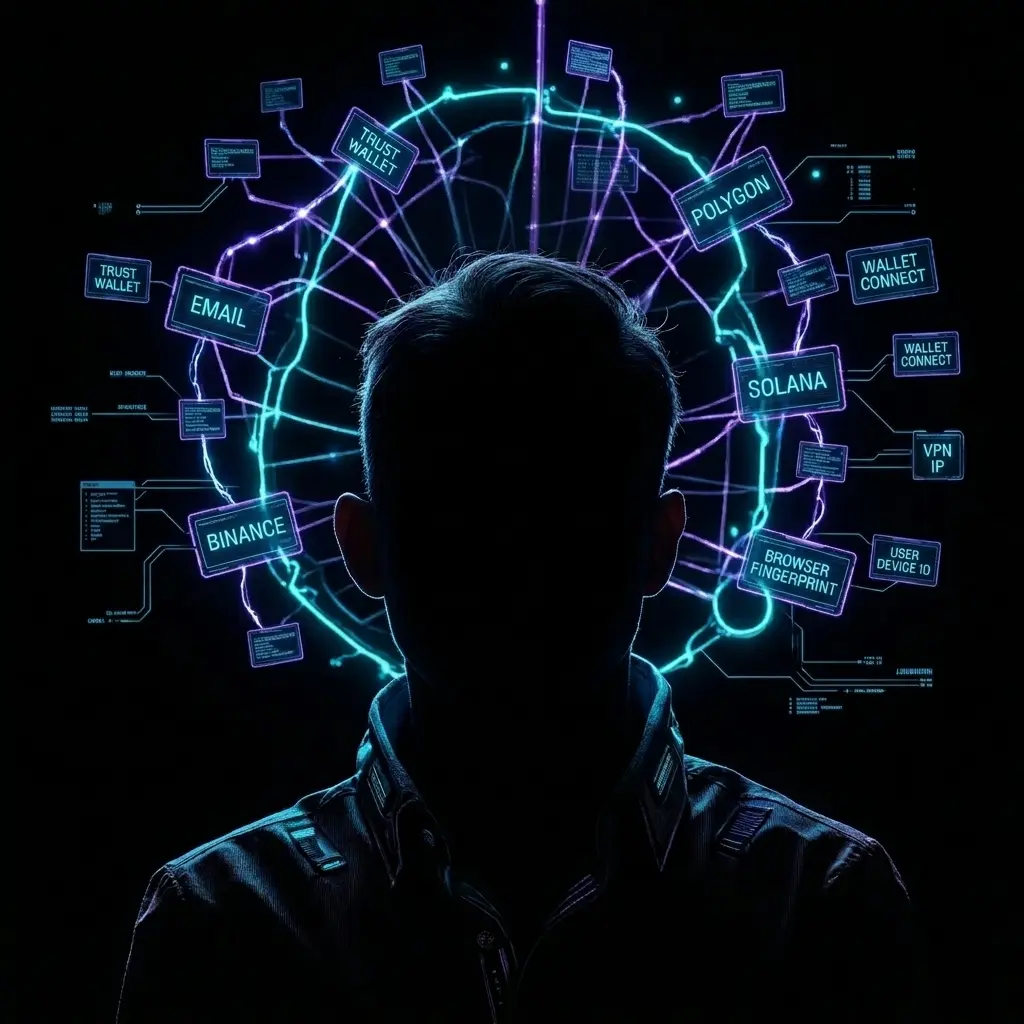
This is a deep dive into the world of "passive fingerprinting"—a technology that turns your browser into a unique digital passport, even if you’ve hidden your IP address.
Many users mistakenly believe that the VPN + Incognito Mode combo is enough to keep their crypto wallets safe. However, for modern anti-fraud systems and analytics platforms, your IP is only about 10% of the picture. The other 90% is hidden in the way your hardware renders pixels.
1. Canvas Fingerprinting: Drawing an Invisible Signature
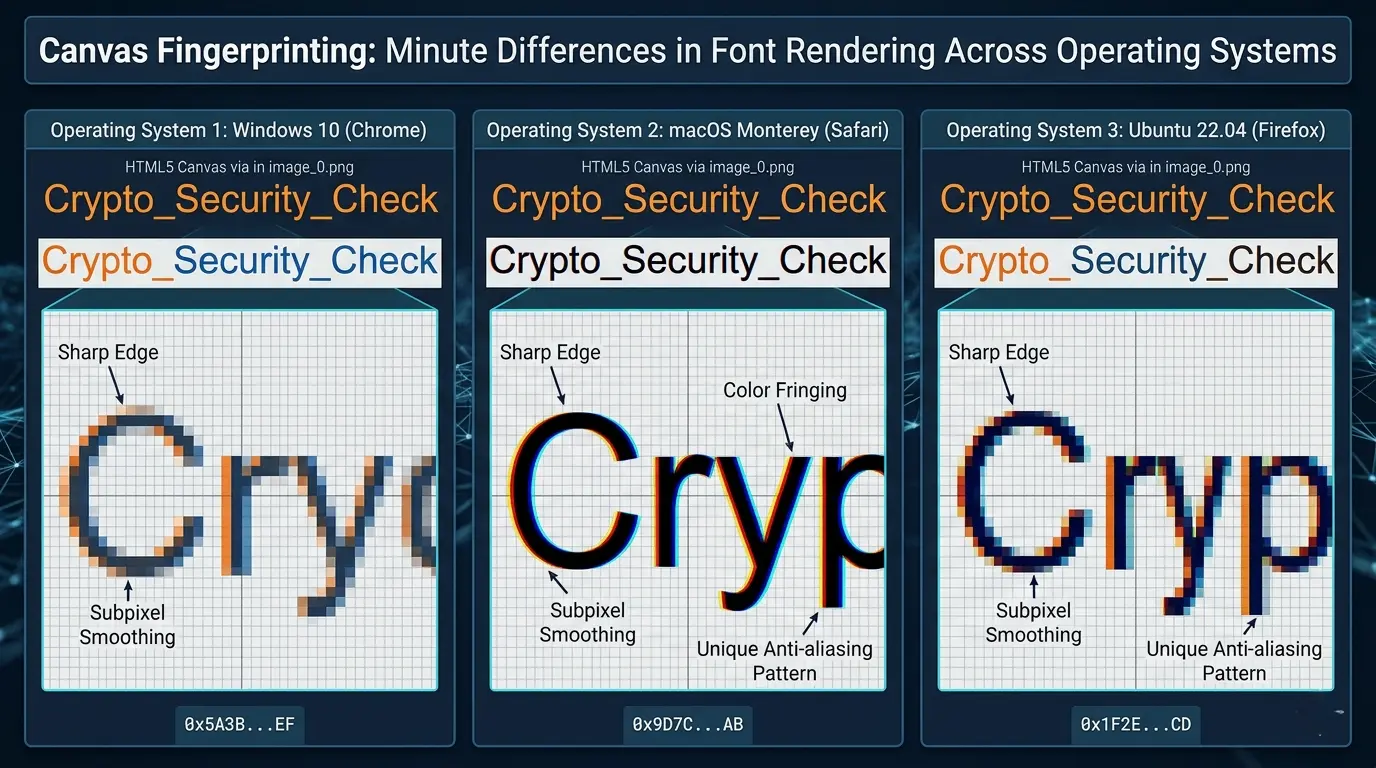
Canvas is an HTML5 element designed to generate graphics via scripts. The crux of this method is that the browser is commanded to render an image or text that remains completely invisible to the user.
How does it work under the hood?
Different graphics cards, drivers, and browser versions use different algorithms for rasterization, anti-aliasing, and font hinting.
- A script asks the browser to draw a string of text using a specific font and gradient.
- The result is converted into a Base64 format or hashed (for example, using SHA-256).
- Even a single-pixel difference at the sub-pixel rendering level creates a completely unique hash.
Sample code logic (JS):
const canvas = document.createElement('canvas');
const ctx = canvas.getContext('2d');
ctx.textBaseline = "top";
ctx.font = "14px 'Arial'";
ctx.fillStyle = "#f60";
ctx.fillRect(125,1,62,20);
ctx.fillStyle = "#069";
ctx.fillText("Crypto_Security_Check", 2, 15);
const fingerprint = canvas.toDataURL().slice(-100); // Grabbing a portion of the hash
console.log("Unique ID:", btoa(fingerprint));
2. WebGL: An X-ray of Your Hardware
While Canvas deals with 2D graphics, WebGL (Web Graphics Library) digs much deeper into your hardware.
Two methods of deanonymization via WebGL:
- WebGL Report: The script requests your GPU parameters: manufacturer name, model, firmware version, memory size, and supported extensions.
- WebGL Image Rendering: The browser is tasked with rendering a complex 3D shape. Due to microscopic differences in GPU floating-point errors, the final image will have unique artifacts at the level of mathematical computation.
Pro-tip: Using Hardware Acceleration in your browser is the ultimate enemy of anonymity. It directly links your browsing session to the specific physical chip on your graphics card.
3. Why is a VPN Powerless Here?
A VPN changes your "mailing address" (IP), but it doesn't change your "fingerprints."
Imagine logging into your wallet through a VPN from the Netherlands, and an hour later through a VPN from Singapore. If your Canvas Hash matches in both cases, an analytics system (like Chainalysis or an exchange’s internal fraud engine) will link those two sessions with 99% certainty.
This allows them to build relationship graphs:
- Linking multiple "anonymous" wallets into a single cluster.
- Deanonymizing an owner by matching the fingerprint to a CEX account (where you’ve completed KYC).
4. Practical Protection Tips
"Basic" Level: Browser Extensions
Installing extensions like CanvasBlocker or Trace.
The Catch: Simply blocking Canvas is a bad move. It makes you even more unique ("the user with the blocked Canvas"). The right approach is adding "Noise." The extension should inject random, invisible pixels so that the hash changes with every session.
"Advanced" Level: Browser Configuration
If you’re using Firefox, you can toggle built-in protection:
- Type
about:configin the address bar. - Find
privacy.resistFingerprintingand set it totrue. - This forces the browser to report standard parameter values to sites and blocks Canvas data reading without explicit permission.
"Expert" Level: Anti-detect Browsers
For serious crypto work, professionals use tools like AdsPower, Multilogin, or Dolphin{anty}.
These don't just block fingerprints; they spoof them using real configurations from other existing devices, creating completely isolated digital identities.
5. Technical Checklist to Audit Your Profile
To see how vulnerable you are right now, check out these resources:
- BrowserLeaks.com — Check the Canvas and WebGL sections.
- Cover Your Tracks (EFF) — Shows how "unique" you are among millions of other users.
- Creepjs — One of the most advanced tools out there; it can actually detect if you're trying to spoof your fingerprints.
A Little-Known Detail: Fonts and Audio. Your list of installed system fonts and the way your sound card processes audio (AudioContext Fingerprinting) work in tandem with Canvas. Even if you protect your graphics, a unique font set can still give you away.
6. WebGL Metadata: Deep GPU Scanning
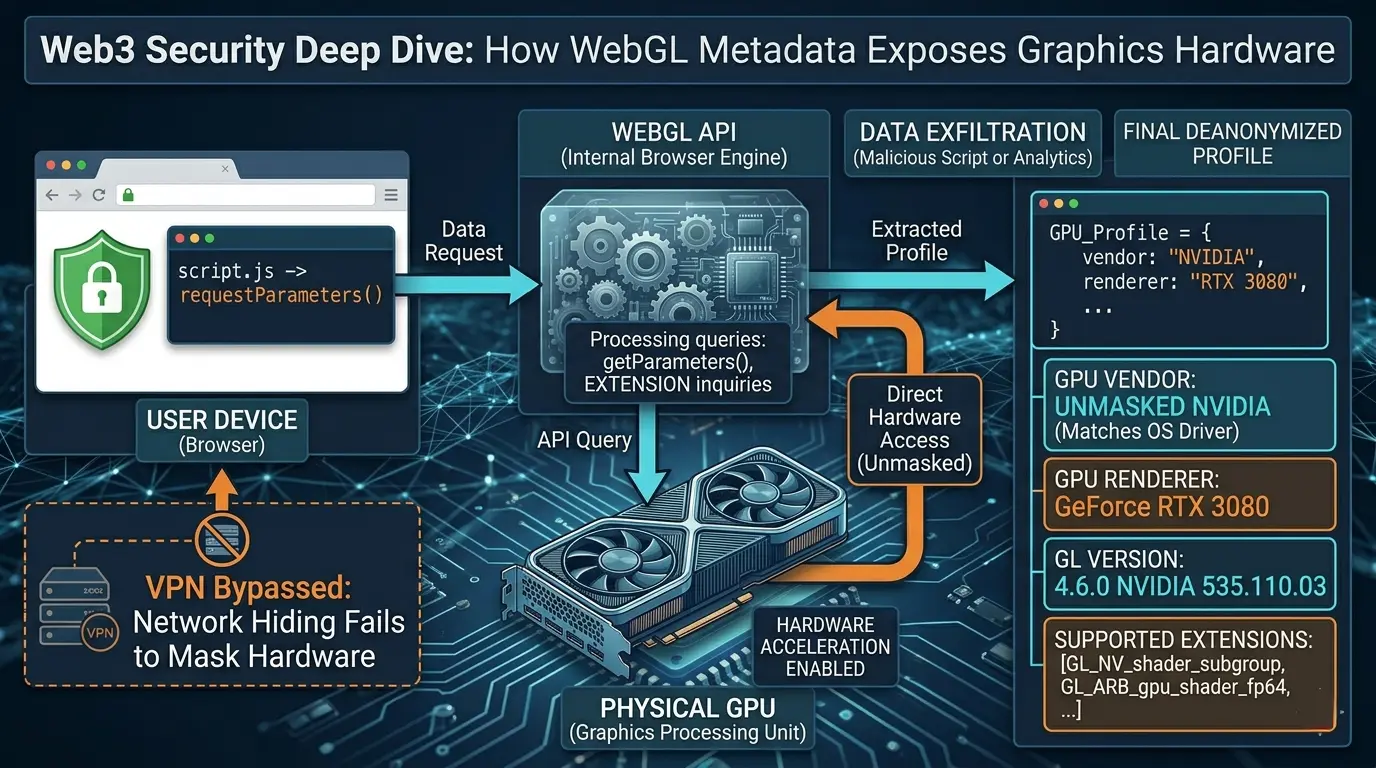
Beyond just rendering images, WebGL allows scripts to extract "Unmasked Vendor" and "Unmasked Renderer" data. These are direct identifiers of your graphics chip. Even if you're using a privacy-focused browser, sites can still sniff out parameters like:
- GL_MAX_TEXTURE_SIZE: The maximum texture size your hardware can handle.
- GL_ALIASED_LINE_WIDTH_RANGE: The supported range of line widths.
- Precision Factors: Floating-point calculation precision in shaders.
When combined with screen resolution and color depth, these data points create a nearly unmistakable hardware signature.
7. The Silent Threat: Audio Fingerprinting (AudioContext)
This is one of the most "under-the-radar" ways to deanonymize a user. The script doesn't record your mic; instead, it taps into the AudioContext API.
How it works:
- The browser is commanded to generate a low-frequency sine wave.
- This signal is processed through a software filter (like a compressor or analyzer).
- Due to minute differences in CPU architecture and OS math libraries, the resulting audio wave has a unique "mathematical signature" or hash.
Since users rarely mess with their audio stack settings, this fingerprint remains extremely stable over time.
8. Fonts and Container Overflows (Font Enumeration)
Your list of installed fonts is basically your bio. If you have specific fonts—say, from Adobe Creative Cloud, engineering software, or rare language packs—you become unique instantly.
Checking for fonts without file system access:
The script creates a hidden <span> block with a standard font (like serif). Then, it tries to apply a rare font to it. If the block’s dimensions change by even 0.001 pixels, the script knows that font is installed. By cycling through a list of 500 popular fonts, a site builds a unique vector for your machine.
9. Interacting with Crypto Wallets: A Dangerous Bridge
A major vulnerability occurs the moment your browser talks to an extension like MetaMask or Phantom.
- Window Object Injection: Most wallets inject the
window.ethereumobject into every page you visit. A site can instantly flag you as a "crypto user" just by checking if this object exists. - Provider Fingerprinting: Different wallet versions return different responses to specific API calls, allowing trackers to narrow you down to a specific software build.
Pro-tip: The Battery Status API attack. Previously, browsers let sites see your battery level and time-to-discharge with precision. This allowed trackers to link sessions even after an IP change or cookie wipe. While patched in most modern browsers, it still works in older versions of Chrome/Opera on Android.
10. Behavioral Fingerprinting (Keystroke & Mouse Dynamics)
This is the "special ops" of deanonymization. It’s not about *what* you do, but *how* you do it.
- Typing Rhythm: The time between key presses (dwell time) and transitions (flight time).
- Mouse Movement: Speed, trajectory curvature, and even the micro-shaking of your hand.
If you access a wallet behind a VPN, but your "mouse driving style" matches a profile from another site, the system can flag both sessions as the same person.
11. Hands-on: What Protection Looks Like in Code
If you’re building a privacy tool or auditing your browser, look into function proxying.
Example code for Canvas spoofing (Proof of Concept):
// Intercepting the Canvas data retrieval method
const originalToDataURL = HTMLCanvasElement.prototype.toDataURL;
HTMLCanvasElement.prototype.toDataURL = function(type) {
    const context = this.getContext('2d');
    // Inject microscopic noise into a corner of the canvas
    context.fillStyle = "rgba(255,255,255,0.01)";
    context.fillRect(0, 0, 1, 1);

    return originalToDataURL.apply(this, arguments);
};
This script "poisons" the data a tracker tries to read, making your hash change constantly. (Note: Constant changes can be a red flag; ideally, noise should be consistent within a single session).
12. Recommendations for a "Sterile Environment"
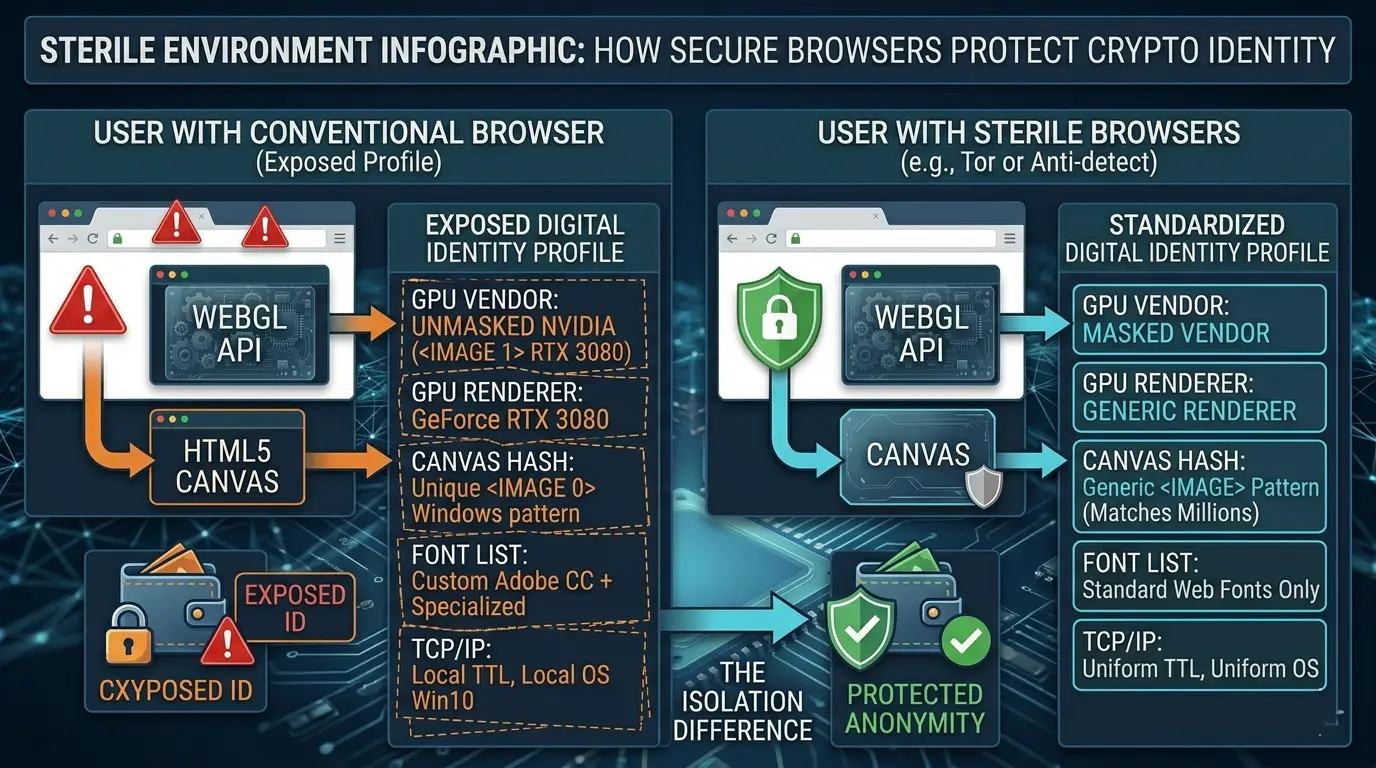
For critical transactions and high-stakes operations:
- Whonix or Tails: OS options that route all traffic through Tor and use a strictly standardized browser. Here, every user has the exact same fingerprint—the best defense is "hiding in the crowd."
- Dedicated Hardware: Use a cheap, "clean" laptop (no personal data) exclusively for crypto, connected via a fresh line.
- Disable JIT in JS: Turning off Just-In-Time compilation (via browser flags) slows down performance but breaks many advanced fingerprinting techniques.
13. The "Lying Browsers" Trap: Why Detecting Spoofing Is a Death Sentence
Modern anti-fraud systems (think Akamai, Cloudflare, or FingerprintJS v3+) aren't just looking for your fingerprint anymore—they’re hunting for signs that you’re faking it. If you’re using a basic extension that just blocks Canvas or feeds the site random noise, the script will flag it instantly.
How they catch you lying:
- Consistency Checks: The script cross-references your User-Agent with your browser’s actual capabilities. If your browser claims to be Chrome on Windows but supports Safari-specific text rendering features, you’re getting flagged for fraud immediately.
- Performance Fingerprinting: Scripts measure the execution speed of specific JS functions. Privacy extensions usually add overhead (latency), and that "extra weight" is very easy to calculate and detect.
- TCP/IP Stack Fingerprinting: Even if your browser is perfectly spoofed, your network stack (TTL size, TCP window parameters) can leak your real OS. A VPN doesn't always mask these low-level packets.
14. The Stealth Vector: Web Workers and Service Workers
Most users are diligent about clearing cookies and cache but completely ignore Service Workers. These are scripts that run in the background even after you've closed the tab.
- They can be used to store a persistent unique ID in the background.
- They have access to
navigator.hardwareConcurrency, pinpointing your exact CPU core count—adding yet another data point to your unique profile.
15. Wallet Extension Vulnerabilities (Side-Channel Attacks)
Your MetaMask might be "leaking" info without you realizing it. When you land on a site, it can fire off a request to a provider (like Infura). If your browser isn't configured for request isolation, an analytics firm can match the blockchain request timing with your site visit. This is a classic Timing Attack.
16. The Safety Protocol (The Gold Standard)
To minimize the risk of deanonymization while managing crypto assets, follow this playbook:
- Context Isolation: Never use your main browser—where you’re logged into Gmail or YouTube—to handle crypto transactions. Period.
- Use Specialized Solutions:
- For Maximum Anonymity: Use the Tor Browser (Standard or Safer mode). It forces your Canvas fingerprint to be identical to thousands of other Tor users. The goal is to blend in.
- For Multi-Accounting: Use high-end "Anti-detect" browsers that use real, fingerprinted profiles (not random noise, but fingerprints harvested from actual systems).
- Hardware Wallets: Using a Ledger or Trezor solves half the problem because your private keys never leave the device. However, your public address can still be linked to your digital profile when you sign a transaction via a browser.
- Kill WebGL: If your workflow allows it, disable WebGL entirely in your browser settings.
- In Chrome: Use the
--disable-webglflag in launch parameters. - In Firefox: Set
webgl.disabled = trueinabout:config.
- In Chrome: Use the
- DNS-over-HTTPS (DoH): Encrypt your DNS queries so your ISP or a local tracker can't see which nodes or wallet APIs you’re hitting.
Summary
In 2026, deanonymization isn't about "hacking"—it's about statistics. Canvas and WebGL are just pieces of a massive puzzle. Your goal is either to become "noise" (via anti-detects) or to become "the standard" (via Tor/Tails).
Remember: A VPN hides your traffic from your ISP, but it does nothing to protect your identity from the site you're visiting. Your browser is the most talkative witness against you.
Summarize this blog post with: