


Guide: Launching a Stacks Signer Node (Nakamoto Edition)
If you're launching a professional node in 2026, the most strategic move is Stacks (Nakamoto Edition). Why? Because after the Nakamoto upgrade, the node operator’s role (Stacker) became mission-critical for the security of the entire ecosystem: you validate fast blocks and maintain the connection to Bitcoin L1.
Below is a practical, hands-on guide to deploying a Stacks Signer Node — the key component required to participate in consensus and earn rewards.
1. System Requirements (Production Ready)
Don’t even think about running this on a home PC. For stable operation in 2026, you’ll need the following specs:
- CPU: 8 cores (AMD EPYC or Intel Xeon recommended).
- RAM: 32 GB (16 GB minimum, but you risk OOM during peak load).
- Storage: 2 TB NVMe SSD (Stacks blockchain + full Bitcoin node grow fast).
- Network: 1 Gbps unmetered connection.
- OS: Ubuntu 22.04/24.04 LTS.
2. Laying the Foundation: Bitcoin Full Node
A Stacks node cannot operate without direct access to L1. You must deploy bitcoind.
bitcoin.conf configuration for L2 integration:
server=1
txindex=1
rpcuser=your_user
rpcpassword=your_password
rpcport=8332
# Critical for L2: enable event subscriptions
zmqpubhashtx=tcp://0.0.0.0:28332
zmqpubhashblock=tcp://0.0.0.0:28332
3. Deploying Stacks Signer via Docker
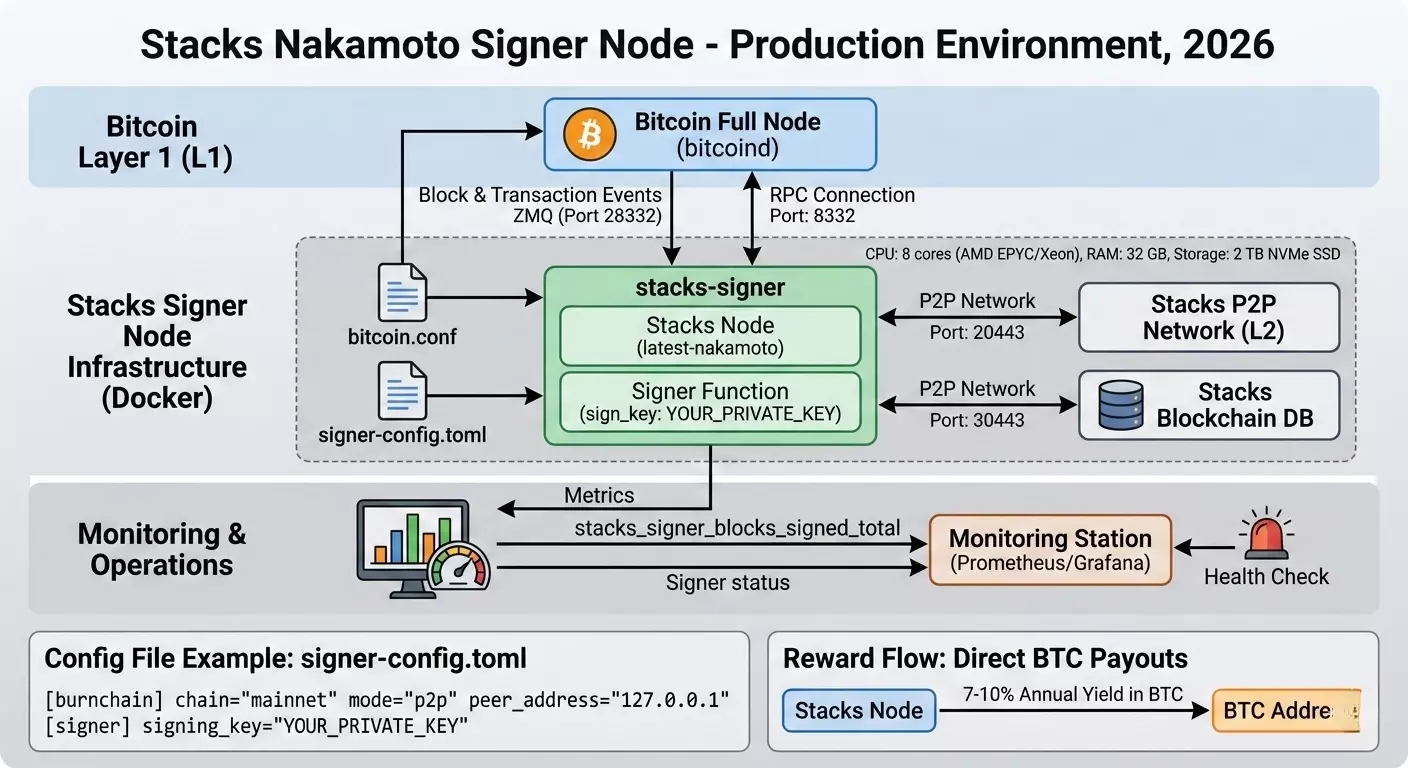
Using Docker is the industry standard for isolation and fast version upgrades.
Creating the signer-config.toml configuration file
This is the “heart” of your node. Here you define your keys and Bitcoin connectivity parameters.
[burnchain]
chain = "mainnet"
mode = "p2p"
# Address of your local Bitcoin node
peer_address = "127.0.0.1"
rpc_port = 8332
username = "your_user"
password = "your_password"
[signer]
# Private key for signing blocks (generated via stacks-cli)
signing_key = "YOUR_PRIVATE_KEY"
# Participation threshold (minimum STX required for solo stacking in 2026)
stacking_threshold = 100000
[network]
port = 20443
events_port = 30443
Starting the container
docker run -d \
  --name stacks-signer \
  -v /var/lib/stacks:/root/stacks-node \
  -p 20443:20443 \
  -p 30443:30443 \
  blockstack/stacks-node:latest-nakamoto \
  /bin/stacks-node signer --config /root/stacks-node/signer-config.toml
4. Critical Operational Considerations (Best Practices)
A. Monitoring and Health Checks
In 2026, missing a block signature (Missed Block) in Stacks can lead to temporary removal from the active signer set (light slashing).
- Use Prometheus + Grafana: Configure alerts for the
stacks_signer_blocks_signed_totalmetric. - Log monitoring:
docker logs -f stacks-signer | grep "Signer status".
B. Key Security
Never store your signing_key in plain text on a server without protection. In advanced setups, use HSMs (Hardware Security Modules) or cloud-based secret storage solutions (AWS Secrets Manager / HashiCorp Vault).
C. Seamless Updates
The 2026 L2 cycle is marked by frequent hard forks aimed at gas optimization. Subscribe to validator update channels and use automated scripts to keep your Docker images up to date so you don’t fall behind mainnet.
5. Economics: How Does It Pay Off?
Running a Signer node gives you the right to participate in Stacking.
- You lock your STX (or delegated STX).
- Your node validates transactions on the L2 network.
- Reward: Direct BTC payouts (not project tokens) to your designated Bitcoin address. In 2026, yields range between 7–10% annually in BTC, making this one of the most capital-efficient strategies available.
Pre-Launch Checklist:
- You have a dedicated static IP address.
- Ports 8332 (Bitcoin) and 20443 (Stacks) are open in your firewall.
- Your Bitcoin node is fully synced (verify via
bitcoin-cli getblockchaininfo). - You have an offline backup of your private key.
That’s it! Your infrastructure is ready to operate within the most powerful ecosystem built on Bitcoin.
1. What are the projected Stacks Signer rewards in 2026? 2. Is it possible to run a Nakamoto Signer node on a home PC? 3. Why does a Stacks Signer need a Bitcoin Full Node?Technical FAQ
In 2026, professional Stacks Signer nodes typically yield between 7–10% annually. Rewards are paid directly in native Bitcoin (BTC), providing a high-quality yield without exposure to L2 token volatility.
While technically possible, it is strongly discouraged. The Nakamoto upgrade requires near 100% uptime; missing block signatures can lead to temporary removal from the signer set. Professional specs (32GB RAM, 2TB NVMe SSD) are the industry standards.
A Stacks Signer acts as a bridge between L1 and L2. It requires direct access to a Bitcoin Full Node via RPC and ZMQ to monitor "burnchain" events and validate transaction finality on the Bitcoin mainnet.